
TaxPromax registration is a key requirement for every business name, company and NGO in Nigeria. It is a one of the first things to do before filing your annual tax returns. In this guide, we will be exploring how to register a company on The Rev360 Taxpromax and the process to validate your TIN on the online portal after registration.
With the New Tax Administration and policies in Nigeria, 2026 is going to be tax year. A lot of businesses have already been setting structures in place to stay in the good books of tax administration.
Every taxable person earning a taxable income in Nigeria is supposed to remit tax to the federal government.
The new policies have also leaded to the change of the Federal Inland Revenue Service (FIRS) to now called Nigerian Revenue Service (NRS).
The Federal Government of Nigeria through its National Tax Policy is trying to widen the tax bracket that will generate high revenue for the government.
The Tax payer who happens to be one of the key stakeholders in the National tax policy is required to stay compliant by engaging in ethical tax practices.
One of the ways companies can maintain a good reputation with the tax authorities is to register on taxpromax and remit taxes as at when due
What is Taxpromax?
Taxpromax is an online tax filing platform where all companies in Nigeria maintain their tax records.
It is a dashboard that harmonizes all taxes paid by each company in Nigeria. Through this portal, companies are able to pay taxes once they are due.
Taxpromax was created by the Federal Inland Revenue Service (FIRS) now Nigerian Revenue Service (NRS) to streamline and automate the process of tax compliance in Nigeria
Through the taxpromax portal, companies can log in into their account, remit taxes and maintain accurate records of tax payment.
The portal also helps the tax bodies in assessing taxpayers and identifying the tax payable and amount payable for a particular period of time.
The taxpromax platform was created for the following purposes
- Electronic tax filing
- E-assessment
- Harmonization of Taxes
- Accurate record keeping
- Quick and easy validation
- Digital record keeping
- Collaboration with Joint Tax Board and Other Tax bodies for efficient and effective tax administration
Benefits of Using Taxpromax
Since the inception of the taxpromax portal, below are the benefits enjoyed by companies and taxpayers
- It encourages faster tax filing
- The platform provides a medium for self assessment
- Automated tax computations
- Instant validation of TIN
- It harmonizes taxes, therefore reducing multiple taxation on same income
- Online TCC processing
- It boosts taxpayer confidence and encourages ethical tax practices
- The revenue and tax authorities now have time to attend to other important issues
- The portal is integrated with JTB TIN
2026 Update: TaxProMax Has Been Replaced by REV360
TaxProMax has been replaced by REV360, the new self-service tax administration platform introduced by the Nigeria Revenue Service (NRS). REV360 enables businesses and individuals to register for taxes, file tax returns, make tax payments, apply for Tax Clearance Certificates (TCC), and manage their taxpayer accounts through a more integrated digital platform.
If you previously had a TaxProMax account, your records may have been migrated to REV360. New taxpayers are generally expected to complete their registration through the REV360 platform.
Difference Between TaxProMax and REV360
TaxProMax
- Legacy tax administration platform
- Previously managed taxpayer registration
- Used for filing federal tax returns
REV360
- New digital tax administration platform
- Improved taxpayer dashboard
- Enhanced online filing
- Better payment integration
- Real-time taxpayer management
- Supports additional digital tax services
Features of Rev360 Taxpromax
Below is everything you can do on the new Rev360 Taxpromax. This portal was created to make tax administration easier for both the government and the taxpayers
- Easy registration as a taxpayer
- Filing of Company Income Tax returns
- Filing of VAT returns
- Filing of Withholding Tax returns
- Ability to make online tax payments
- You can apply for Tax Clearance Certificate
- Update taxpayer information
- View tax history
- Download tax receipts
What Existing TaxProMax Users Should Know
If your business previously used TaxProMax, you generally do not need to create a completely new taxpayer profile.
Existing records are being transitioned to REV360, although you may need to activate or create new login credentials depending on your migration status.
After logging in, review your taxpayer profile and update your contact details where necessary
Requirements for Rev360 TaxPromax Online Registration in Nigeria

Before any entity can register on the taxpromax portal, they must provide the following;
- Such company or NGO must be registered with CAC
- TIN Number from either FIRS or JTB
- An active email address that is already linked to TIN
- Registered business information
- Tax office of choice
- Phone number
- BVN of the Directors/Shareholders/Trustees
Who Should Register on REV360?
The following entities registered with CAC must register on the new REV360 Taxpromax platform
- Limited Liability Companies
- Business Names
- Companies Limited by Guarantee
- Incorporated Trustees carrying on taxable activities
- Foreign companies with Nigerian tax obligations
Benefits of REV360 Registration
- Online tax filing
- Digital tax payments
- Tax Clearance Certificate applications
- Centralized taxpayer records
- Improved compliance tracking
- Faster tax administration
- Better record management
TaxPromax Registration Online in Nigeria For Company
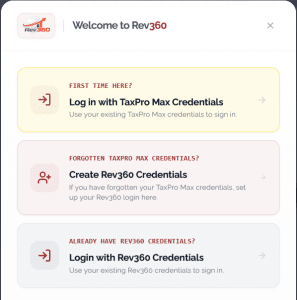
Follow the steps below to register a company on Taxpromax in Nigeria
- Get the CAC documents handy. You need the status report and MEMART to provide you with adequate information on the company.
- Visit the Taxpromax registration portal
- Click to register
- Select Corporate Affairs Commission from the list
- From the options, select limited liability company
- Copy and paste the RC number of the company (use only the digits and leave out the RC)
- Click to search
- The next page will display a phone number and email and prompt you to receive OPT. Select email address if you are the CAC accredited agent that did the registration, or select the phone number option to receive the OTP code through the phone number used for company during registration
- Get the OPT code and click to validate
- Fill in the company information such as address, email and nature of business activities.
- Select if the company has commenced business operations or not. Accounts are always made up to 31st of December yearly
- Select if the business is new or existing. Proceed and pick the category of business that fits it.
- Select your preferred tax office. The tax office should be the one closest to your company business address. Don’t choose Tax office in Abuja when you reside in Lagos.
- Select to activate e-services. This enables you to file your taxes online
- Fill in name of the person and email responsible for the e-services filing. This can be the shareholder or the most prominent person on the company documents
- Type in “Director or Trustee”under user designation
- Fill the name with director and declare you have been appointed by the company to file tax returns
- Submit
- The login details will be sent to client.
Rev360 TaxPromax Online Validation

Tax Promax validation is simply the process of checking and verifying that a TIN is valid on the website.
The purpose of validation is to ensure such company has been registered on the Rev360 Taxpromax portal.
Validation is done by Banks and other agencies when trying to access the tax trustworthiness of a company
To carry out this validation
- Visit the Rev360 portal as usual
- Click on Corporate Affairs Commission
- Follow the guide above and obtain the OPT code
- Go back to continue registration
- Paste the OTP
- Click on Validate.
Congratulations, your TIN has been validated successfully.
From here, you can proceed and fill the other information and complete the egistration.
Taxpromax OTP Issues
Recently, due to the upgrade on FIRS and taxpromax website together with the JTB website, the portal has not been sending OTP to emails or phone numbers.
What this means is that the tax authority expects entities and taxpayers to visit the tax office before to successful register and validate a company on Tax Promax.
However, we have a way to sort it out and save you the stress.
Legacy Benjamin Consult will help process your Rev360 tax promax registration and validation without stress. Send us a DM on WhatsApp @ 08066108299 and let’s get started
Why Businesses Should Transition to REV360
REV360 is the successor to TaxProMax and represents the latest phase of Nigeria’s digital tax administration. It provides a single platform for taxpayer registration, tax filing, payments, compliance monitoring, and Tax Clearance Certificate applications.
Businesses that transition to REV360 can benefit from a more streamlined compliance process, improved record management, and easier access to essential tax services.
As Nigeria continues to modernize its tax system, keeping your taxpayer information up to date on REV360 will help reduce compliance challenges and improve interactions with the tax authorities
Frequently Asked Questions
What is Taxpromax used for?
It is an online portal that helps businesses to assess, pay taxes and keep accurate records of their tax payments
Can Taxpromax registration be done without a TIN?
No. You need TIN
How do I validate my TIN on Taxpromax?
You can validate this by visiting the validation page after receiving your OTP
Can individuals register on Taxpro Max?
Not really. However, business names are supposed to register for the purpose of VAT and WHT remittance
Does TaxPro Max issue TCC?
Yes
Can a consultant manage Taxpromax for a business?
Yes, a certified tax consultant can handle your filings and returns
Has TaxProMax been replaced?
Yes. TaxProMax has been replaced by REV360, the Nigeria Revenue Service's new digital tax administration platform
Can I still log in to TaxProMax?
Existing taxpayers are being transitioned to REV360. Depending on your migration status, you may need to create or use REV360 credentials to access your tax account.
What is the difference between TaxPro Max and REV360?
REV360 is the successor to TaxPro Max. It provides enhanced taxpayer registration, filing, payment, and compliance features within a more integrated digital tax administration system.
Can I register a new business on REV360?
Yes. New taxpayers are expected to use REV360 for tax registration and related compliance processes.
Cost of Rev360 Taxpromax in Nigeria
Depending on the consultant, the cost to register for Rev360 Taxpromax ranges from ₦30,000 to ₦80,000
Conclusion




Comments 0
No comments yet
Be the first to share your thoughts.
Leave a Comment
Your email will not be published.